Activity Placemat Template: The Frame-and-Blocks Layout Behind a Finished Mat
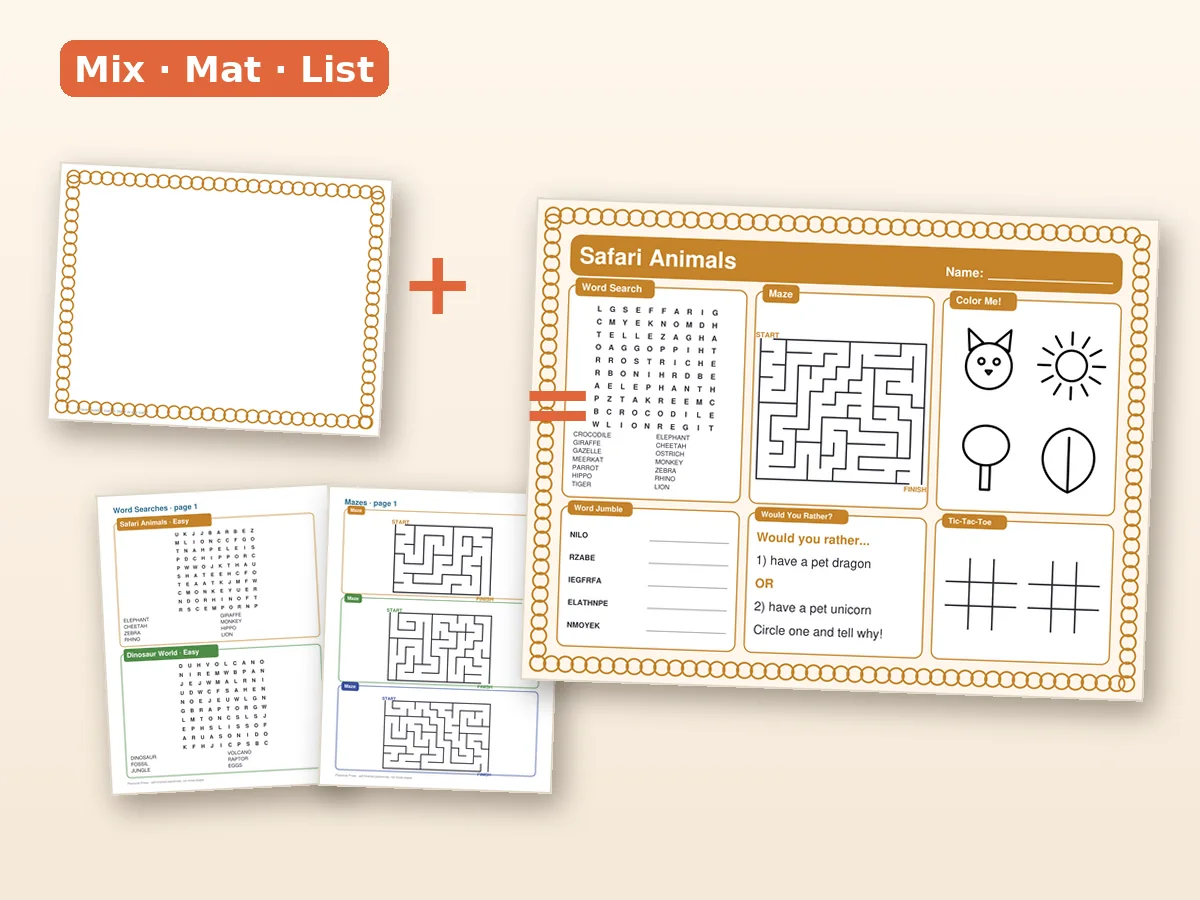
An activity placemat template is a frame plus empty slots, and the quality of the template decides how long a placemat takes. If the slots are the right size and the blocks are designed to fit them, you can finish a mat in an evening. If they are not, you spend the evening nudging boxes by two millimeters. This guide explains the layout system used in the Placemat Press · Activity Mat Creator Kit so you can build your own or at least recognize a good one.
The three layers
Every placemat is three layers stacked:
- Frame: the border, corners and title area.
- Grid: the invisible slots where blocks sit.
- Blocks: the actual activities.
The most common mistake is to treat the placemat as one big picture. Treat it as three layers and each becomes simple.
Layer 1: the frame
The frame defines the mood and the safe area. Corner frames are the most flexible because they leave the center open. Ten corner frames cover enough styles to switch themes without redrawing anything: playful, seasonal, simple, bold.
Layer 2: the grid
A grid is a division of the page into slots. For a landscape sheet, a 3 by 2 grid (six slots) or a 2 by 2 grid with a title band (four blocks and a banner) work best. Keep a half-inch margin all around and a quarter-inch gutter between blocks, so nothing touches.
Layer 3: the blocks
A block is a self-contained activity sized to fit one slot (or two). The kit has blocks for:
- word searches (24, with answer keys),
- mazes (24, with solutions),
- word jumbles (12),
- coloring elements (23, also as SVG),
- jokes (40),
- would-you-rather prompts (60),
- handwriting practice (28),
- design-your-own prompts (6),
- simple games (112: tic-tac-toe, dots-and-boxes, hangman boards).
A copyable 11x17 layout
``` +--------------------------------------------+ | TITLE BANNER [name field] | +----------------+---------------+-----------+ | Word search | Maze | Coloring | | (2 slots) | (2 slots) | element | +----------------+---------------+-----------+ | Joke + WYR | Paper game | Design- | | | (tic-tac-toe)| your-own | +----------------+---------------+-----------+ ```
On landscape Letter or A4, reduce to a 2 by 2 grid plus banner and drop the design-your-own block. The proportions are the same; the number of blocks falls to four.
Working in Canva or any design tool
You do not need special software. The steps work in any editor that handles PDFs and SVGs:
- Create a canvas at the chosen size (11x17 in, A3 or landscape Letter/A4).
- Place the frame as the bottom layer.
- Add guides at the margin and gutter.
- Drop blocks into the slots. Resize in proportion only.
- Add the title and name field.
- Export a flattened PDF at print quality.
Because the coloring elements come as SVG, you can scale them without blur and change the stroke color to match the frame.
Block rules that save time
- Equal weight: do not put two dense puzzles side by side. Alternate dense with light.
- One quiet block: always one coloring or prompt block that needs no reading.
- Answer keys off the page: keep solutions in a separate file. A solution on the mat spoils it.
- Title first: write the title before you choose the blocks; it keeps the theme consistent.
Three template styles to try
| Style | When to use | Blocks |
|---|---|---|
| Classic 6-block | Everyday mat for ages 5-9 | Word search, maze, jumble, joke, game, coloring |
| Little ones 4-block | Ages 3-5 | Coloring, easy maze, shape trace, game |
| Big kids 5-block | Ages 9-12 | Word search, jumble, would-you-rather, maze, dots-and-boxes |
Why starting from a template is faster
A blank canvas gives you a thousand choices, and most of them are bad. A template reduces the choices to the ones that matter: which theme, which frame, which four to six blocks. That is exactly the idea behind Mix, Mat, List. The Start Here guide and the training document in the kit walk you through the first mat step by step, so by the time you reach your second one you already know where everything goes.
Test, then print
Print a draft at actual size. Check:
- Is any text smaller than 12 points?
- Do maze lines look thick enough for a crayon?
- Does the name field have enough room for a long name?
- Does the layout survive a plate and a glass on top?
For sellers
If you plan to sell, the same template can produce a dozen products: change the frame and the words, keep the grid. The commercial licence covers finished placemats you create; you may not resell or share the kit or its loose elements. See how to sell printables on Etsy for the full path from file to live listing, and the listing template guide for the words.
Getting the kit
The Placemat Press · Activity Mat Creator Kit costs $17.00, one time. It includes 349 commercial-use elements, 10 corner frames, 12 finished placemats in four sizes, a Start Here guide, a training document, a listing template and the commercial licence. Sizes are covered in the size guide, and the full mat-building method is in the placemat printable guide.
Building the second mat in half the time
The first mat is slow because you are learning where things go. The second is fast if you save your work properly.
- Duplicate, do not restart. Save your first mat's project as a master and duplicate it for the next theme.
- Swap, do not redraw. Replace the frame, change the title, drop in a different word search and maze. The grid stays untouched.
- Keep a words sheet. A simple list of eight seasonal words for each theme means the word search never takes more than a few minutes.
- Name files clearly. "dino-tabloid-final.pdf" beats "mat3 copy final2.pdf" when you have twelve versions.
- Keep one folder per sheet size. Tabloid, A3, Letter landscape and A4 each get their own folder so you never print the wrong one.
A third benefit of working from a grid is consistency. When four mats share the same layout, a customer or a family recognizes them as a set. That makes a bundle natural, and it makes your tenth mat feel like part of a collection rather than a one-off. If you give each mat a small tag in the corner ("Mat No. 3 of 12"), children start asking for the next one, which is exactly the reaction you want from a good template.